v1.0

Major VersionM

by Greg Foley

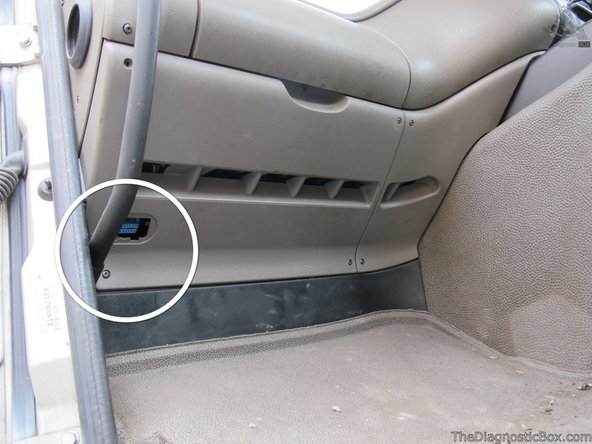
  1. The vehicle's OBD-Port is located at the bottom of the dashboard in the passenger's footwell behind a plastic cover labelled "OBD"
    • The vehicle's OBD-Port is located at the bottom of the dashboard in the passenger's footwell behind a plastic cover labelled "OBD"

  2. Unclip and remove the cover from the fuse-box
    • Unclip and remove the cover from the fuse-box

  3. Use a size T20 Torx-driver to remove the five screws, then unclip and remove the bottom panel of the dashboard
    • Use a size T20 Torx-driver to remove the five screws, then unclip and remove the bottom panel of the dashboard

  4. Carefully unclip and remove the OBD-Port
    • Carefully unclip and remove the OBD-Port

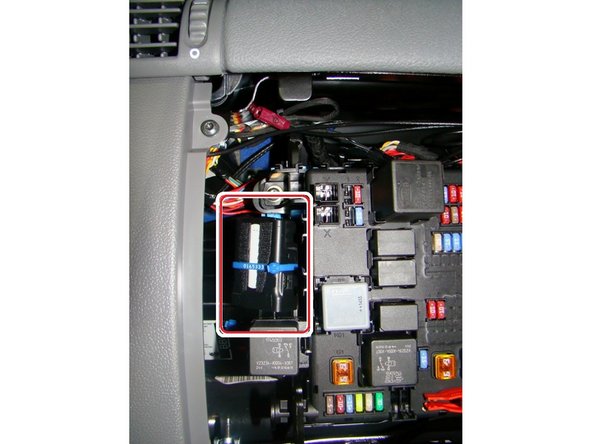
  5. Clip ADAPTOR 11 of the Geotab harness into the vehicle’s mounting bracket
    • Clip ADAPTOR 11 of the Geotab harness into the vehicle’s mounting bracket

  6. Insert the core connector from the T-harness and clip it into place.
    • Insert the core connector from the T-harness and clip it into place.

    • Connect the small connector from the Core, into the mating part from the T-harness

  7. Plug the GO device into the HRN-CG13S1, and then into the T-harness, securing both connections with cableties as shown
    • Plug the GO device into the HRN-CG13S1, and then into the T-harness, securing both connections with cableties as shown

  8. Plug the vehicle’s OBD-Port into the “long” connector of the Geotab harness and secure with a cable-tie, as shown.
    • Plug the vehicle’s OBD-Port into the “long” connector of the Geotab harness and secure with a cable-tie, as shown.

  9. Secure the Geotab unit to a suitable bracket inside the dashboard, using at least 2 cable-ties.
    • Secure the Geotab unit to a suitable bracket inside the dashboard, using at least 2 cable-ties.

    • Ensure that the harness does not obstruct any moving parts or equipment

    • Finally, replace all panels, screws and clips in the reverse order they were removed

  10. The GPS-antenna is located at the “underside” of the Geotab device. Take care when securing the device into the vehicle, that this side is facing away from any metal surface
    • The GPS-antenna is located at the “underside” of the Geotab device. Take care when securing the device into the vehicle, that this side is facing away from any metal surface

    • Finally, replace all panels, screws and clips in the reverse order they were removed

Finish Line

Greg Foley

Member since: 1/12/22

3 Guides authored

Team